ONLYOFFICE 10.0 Embeds AI Across All Editors, With Open Source Versions Requiring Separate Installation
The office suite maker has integrated artificial intelligence capabilities into every editor in its 10.0 release, though it structured the open source versions to keep AI tools optional and installable separately.
ONLYOFFICE is deploying AI functionality throughout its entire editor lineup with the 10.0 release, though the company has chosen to exclude these capabilities from open source versions by default. According to the company, this approach reflects feedback from users, requiring those running open source editions to install AI tools independently if desired.
The suite encompasses several distinct products. Docs serves as a self-hosted or embeddable editor platform, Desktop Editors deliver the toolset to Linux, Windows, and macOS systems, and DocSpace enables team-based collaborative workspaces. The company also offers a Workspace bundle combining web and mobile applications for iOS and Android.
ONLYOFFICE Docs 10.0: Key Additions
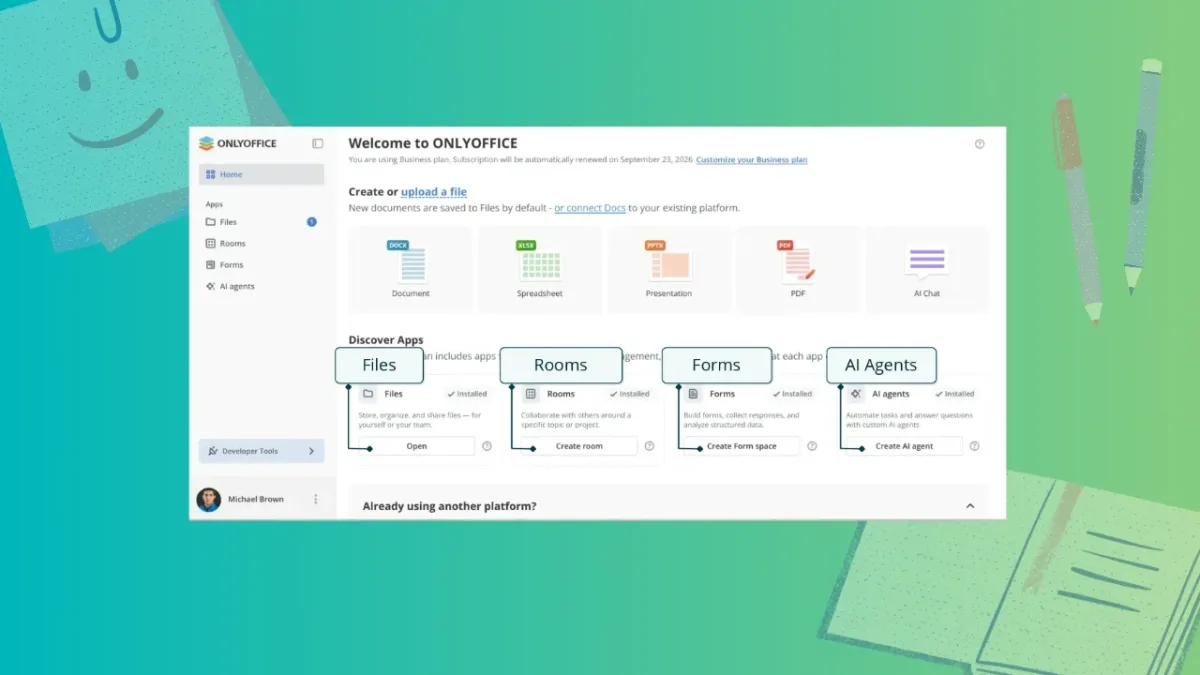
The 10.0 release introduces a home screen featuring a Discover Apps section with four pre-installed free applications: Files, Rooms, Forms, and AI agents. Each operates as an optional modular component users can activate as needed.
Files manages document storage, organization, and distribution. Rooms provides team collaboration capabilities. Forms enables creation and analysis of user surveys and questionnaires. AI agents allow deployment of automated systems for task execution and question answering, with support for MCP servers and capabilities including extended reasoning, search functionality, and custom knowledge base integration.
Editor Enhancements
PDF Editor
The Redact tab introduces a "Remove hidden information" function that strips metadata prior to file sharing. The Comment tab now includes signature functionality, while the Edit Text function gains automatic table recognition.
Document Editor
A "Keep with next" setting has been added to paragraph advanced options, preventing headings from separating from associated content, including within tables and block elements. Inline objects like graphical formulas now render more consistently in right-to-left language documents. Line-based cropping removes content extending beyond line height boundaries. Horizontal lines, introduced in Docs 9.4, now have dedicated configuration options.
During collaborative editing sessions, a "Follow/Stop" option appears in the active editor list. Selecting it synchronizes your cursor position with another user's cursor; choosing "Stop following" terminates this tracking.
Spreadsheet Editor
Performance improvements and usability refinements benefit large workbooks, with styles and data now stored separately to reduce cell processing overhead. Cut and copy operations now display dynamic outlines around selected cells for visual confirmation. Sheet backgrounds persist when files are saved and reopened. Function constant hints display as users enter formulas.
Presentation Editor
Presentations can now be exported as GIF or video files. The View tab provides access to Outline View, Reading View, Notes Page, Notes Master, and Handout Master options. Print settings have expanded to include notes, handouts, and outlines through the File tab.
AI Capabilities Across Editors
Each editor includes a dedicated AI Tools tab launching an AI chat interface with preloaded common actions and user-saved prompts.
Document editors can summarize, rewrite, translate, and proofread text, with options to generate tables of contents, titles, and formatting. Presentations receive outline generation, slide title creation, speaker notes, and visual concept suggestions. PDFs can be summarized instantly, queried for answers, used to draft emails, and have confidential information redacted. Spreadsheets can clean messy data, write and explain formulas, identify trends, and generate forecasts and Pivot Tables.
Quick AI actions and AI assistants handle single-use tasks like tone adjustment and provide persistent assistance during editing, though these features currently exist only in the Document Editor.
Cloud-based deployment requires wallet funding to access the ONLYOFFICE AI service, which manages model configuration and deployment. Self-hosted installations can leverage any major cloud-based AI provider or local alternatives such as Ollama.
Availability
The cloud version of ONLYOFFICE Docs 10.0 is currently available through DocSpace, with free accounts providing access to test the editors. Self-hosted deployments are still receiving the update rollout. Linux users and those on other platforms can access Desktop Editors as an alternative.