Amazon ECS Auto-Repair Features Shift Infrastructure Resilience Burden to the Platform
Amazon ECS now automatically detects and repairs failing GPUs, degraded instances, and other infrastructure problems, reducing the operational overhead site reliability engineers face when maintaining production workloads.

Keeping applications running continuously through infrastructure disruptions is a fundamental requirement of production operations. Hardware degrades, network partitions occur, and dependencies slow down—not as exceptional events but as routine aspects of operating at scale. The question that separates reliable systems from fragile ones is not whether failures happen, but what happens next and who bears responsibility for recovery.
Outages often trace back to predictable failure modes: a GPU accumulating hardware faults that cascade into task failures, an Availability Zone experiencing networking problems, or a logging service degrading and dragging dependent applications down with it. Each of these scenarios demands detection and remediation, work that has traditionally fallen to site reliability engineers building custom automation and maintaining it at scale.
Amazon ECS now handles much of this detection and recovery automatically. The service is designed to manage failures that ECS itself can reliably detect and fix, while exposing controls for ambiguous cases where the correct response depends on workload-specific requirements. This approach builds on existing ECS resilience principles—static stability across Availability Zones, pre-scaling capacity, and workload isolation—by adding recovery mechanisms on top of those foundations.
Under the AWS shared responsibility model, AWS owns infrastructure resilience while customers own application resilience. Much of what ECS now does operationally mirrors patterns AWS uses internally to maintain its own systems, making those patterns available as sensible defaults for customer workloads. ECS Managed Instances exemplifies this: the service takes over responsibility for instance infrastructure health, applying operating system, kernel, and GPU driver patches without disrupting application availability by rolling updates gradually, monitoring for failures, and rolling back when problems appear.
Instance degradation and GPU faults
When an instance degrades, every task running on it faces risk, and the longer it remains in service, the wider the failure spreads. Rapid detection and removal from rotation is essential to contain damage. GPU inference workloads running on accelerated instances face particular challenges: a GPU throwing correctable ECC errors that escalate into faults will slow or fail tasks, yet these faults often remain invisible to standard EC2 instance status checks because the GPU is passed through to the instance.
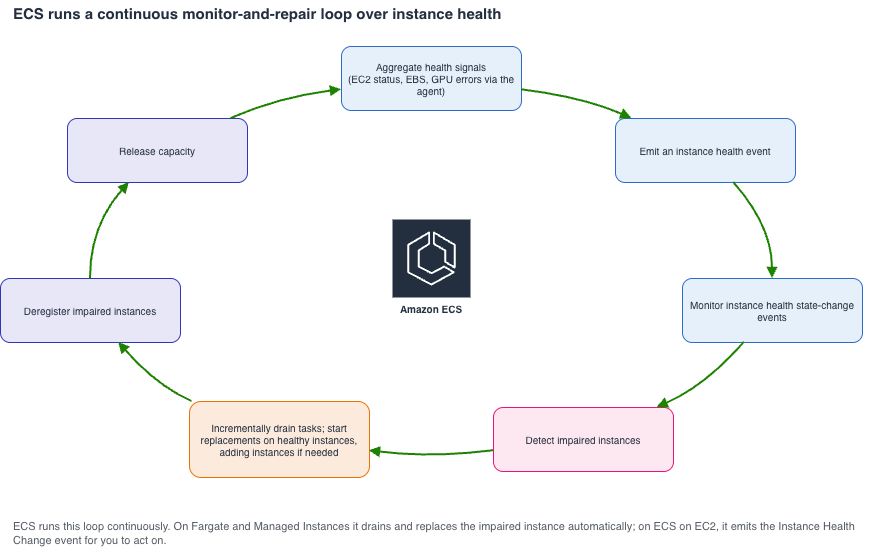
ECS Managed Instances close this visibility gap by integrating with NVIDIA's Data Center GPU Manager (DCGM). The integration watches for error classes that indicate genuine hardware faults rather than transient or non-critical issues. Beyond GPU monitoring, ECS tracks broader instance health through EC2 status checks and on-instance data plane components including the ECS agent and container runtime.
The ECS agent manages tasks and maintains their connection to the ECS control plane. When the agent loses control plane connectivity, task state can drift from desired state, and the instance becomes opaque to monitoring and management. Metrics, logs, and health signals stop flowing, and ECS can no longer reliably stop or replace tasks on that instance. For services, stranded tasks consume capacity limits and block healthy replacements. ECS automatically detects sustained agent connectivity loss and marks the instance as impaired, though brief interruptions that recover on their own do not trigger recycling.
GPU auto-repair and agent-connectivity repair are enabled by default on supported platforms at no additional cost. ECS exposes instance health through the DescribeContainerInstances API and publishes Instance Health Change events to Amazon EventBridge for Managed Instances and ECS on EC2, allowing customers running their own capacity to trigger custom Auto Scaling and instance-replacement workflows based on container instance health.
Availability Zone events and rebalancing
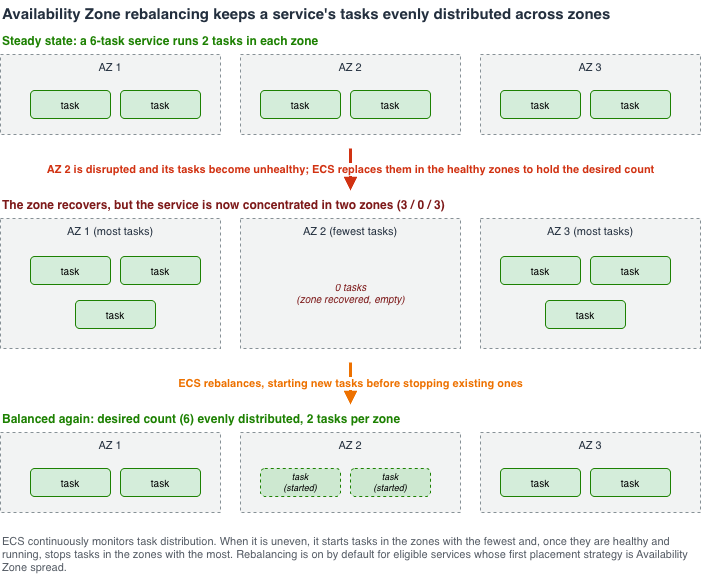
Availability Zones provide fault isolation within a Region, but that isolation only protects workloads capable of absorbing the loss of one zone. When a zone becomes impaired, two problems compound: surviving tasks become unevenly distributed, concentrating load on remaining zones, and traffic between tasks may cross zone boundaries in ways that amplify the blast radius. Manual rebalancing is slow and error-prone during the exact moment when speed matters most.
ECS factors Availability Zone health into placement decisions. When it detects trouble in a zone—elevated task or instance launch failures or health events from other AWS services—it automatically steers new placements away from that zone until recovery occurs rather than adding load to an already struggling zone. When events leave tasks unevenly distributed across zones, ECS Availability Zone rebalancing corrects the distribution by starting tasks in zones with the fewest running tasks and, once those are healthy, stopping tasks in zones with the most, until the spread is even again.
This rebalancing is on by default for eligible services: those whose first placement strategy is Availability Zone spread or that set no placement strategy. Services using Service Connect can enable Zone-Aware Routing to direct each call to an endpoint in the caller's own Availability Zone, keeping traffic within a zone during normal operation and reducing cross-zone exposure when a zone degrades.
For ECS services, tasks are spread evenly across Availability Zones by default, so rebalancing maintains even distribution. Customers can ensure sufficient capacity headroom across zones to absorb an Availability Zone outage through pre-scaling: with tasks spread across at least three zones, losing one removes roughly a third of capacity instead of half, so the surviving zones can carry that load.
Container failures and task recovery
Failures often localize to a single container within an otherwise healthy task. In these cases, keeping the task running and repairing the container in place is preferable to tearing down the task and rescheduling it. A reschedule discards mostly healthy work and creates churn for the scheduler and fleet, making in-place recovery the less disruptive choice.
A task running a main application container alongside sidecars such as a metrics agent and proxy may experience a sidecar crash. With a container restart policy, ECS restarts the failed container without relaunching the task, allowing the task to continue serving while the container recovers and avoiding unnecessary rescheduling. Customers can specify which containers are eligible for restart and list exit codes that should not be retried, so containers failing for non-recoverable reasons surface instead of restarting in a loop. This matters most when capacity is under pressure, such as during an Availability Zone event: keeping a task alive by restarting a container in place preserves capacity that would otherwise need rebuilding.
The same principle applies at task launch. On Managed Instances, ECS attempts to pull each image to pick up tag updates, but if the pull fails and the image is already cached on the instance from an earlier task, it falls back to the cached copy and launches the task anyway rather than failing over a transient registry or network problem. On ECS on EC2, customers can opt into similar behavior with the ECS_IMAGE_PULL_BEHAVIOR agent setting. Either way, transient failures in uncontrolled dependencies—a throttled registry or network blip—do not cost a task that could have launched from the cached copy.
Safer defaults chosen for you
Most ECS recovery mechanisms address infrastructure failures. How applications behave when their dependencies fail normally falls on the customer side of the shared responsibility model. However, in a few cases ECS has observed defaults working against customers often enough that the service changed them on behalf of users, moving the safer choice into the platform so customers inherit it rather than discovering and configuring it.
Logging provides the clearest example. ECS originally supported only blocking log delivery: when the logging backend is slow, throttled, or unavailable, writes to stdout and stderr block, and if the application logs faster than delivery can keep up, back pressure can stall or crash it. A large-scale logging outage could take application availability down even though logging is not on the critical path. ECS later added non-blocking delivery to avoid this, dropping logs that cannot be delivered rather than blocking the container, but it remained opt-in and most customers never enabled it.
ECS changed the default carefully. Because some workloads genuinely depend on blocking mode, the switch happened in stages rather than overnight: the account setting shipped first so anyone needing blocking could opt into it, advance notice preceded the change, and only then did the default move, giving customers requiring guaranteed delivery time to preserve it.
In effect, the workload now fails open when its logging dependency degrades: It keeps serving and drops the logs it can't deliver, rather than failing closed.
Non-blocking is now the default log driver mode, applied to existing and new services without requiring action, so a logging outage no longer stalls applications by default. This represents a real durability-versus-availability tradeoff, and the default now favors availability, which is the right choice for most workloads. Customers who must guarantee delivery for billing, audit, or regulatory reasons can still choose blocking mode through the log driver account setting or per task definition.
This reasoning extends beyond logging. The same principle underlies spreading tasks across Availability Zones by default for services, starting replacement tasks before stopping existing ones during draining and deployments, and during rolling deployments, replacing a failed task from the version it already belongs to rather than the new version that may still be failing to launch. Where a better default helps most customers without removing control, ECS makes it the default and leaves the option to override it.
Testing resilience with fault injection
ECS integrates with AWS Fault Injection Service (FIS), allowing customers to test how resilient their applications are against various failure conditions. ECS task actions enable controlled fault experiments against running tasks, from stopping tasks to injecting resource and network faults, so customers can see how workloads and recovery settings perform before real events test them.
Network fault injection is now available across ECS launch types, including AWS Fargate. Customers can inject latency, packet loss, or a black hole into tasks and confirm that timeouts, retries, and fallbacks behave as expected when dependencies become slow or unreachable. The sample network faults on ECS Fargate with the FIS project provides a starting point.
The approach remains consistent across every failure mode covered—failing instances, impaired zones, crashed containers, degraded dependencies: ECS handles the undifferentiated heavy lifting of detection and recovery, while leaving control to customers where the right response depends on workload specifics. Customers inherit the safe default and retain the override.
ECS aims to simplify designing for failure. By handling routine, mechanical recovery work, it frees effort for resilience specific to each application, and its FIS integration lets customers test that resilience. The defaults and controls described here serve as a starting point; customers should tune them to what their workload actually needs and provide feedback on where defaults should be smarter.