M6 iMac delivers incremental gains in a design that refuses to evolve
Apple's latest iMac refresh brings faster silicon and modest performance improvements, but the all-in-one desktop remains fundamentally unchanged—and costs more than ever.
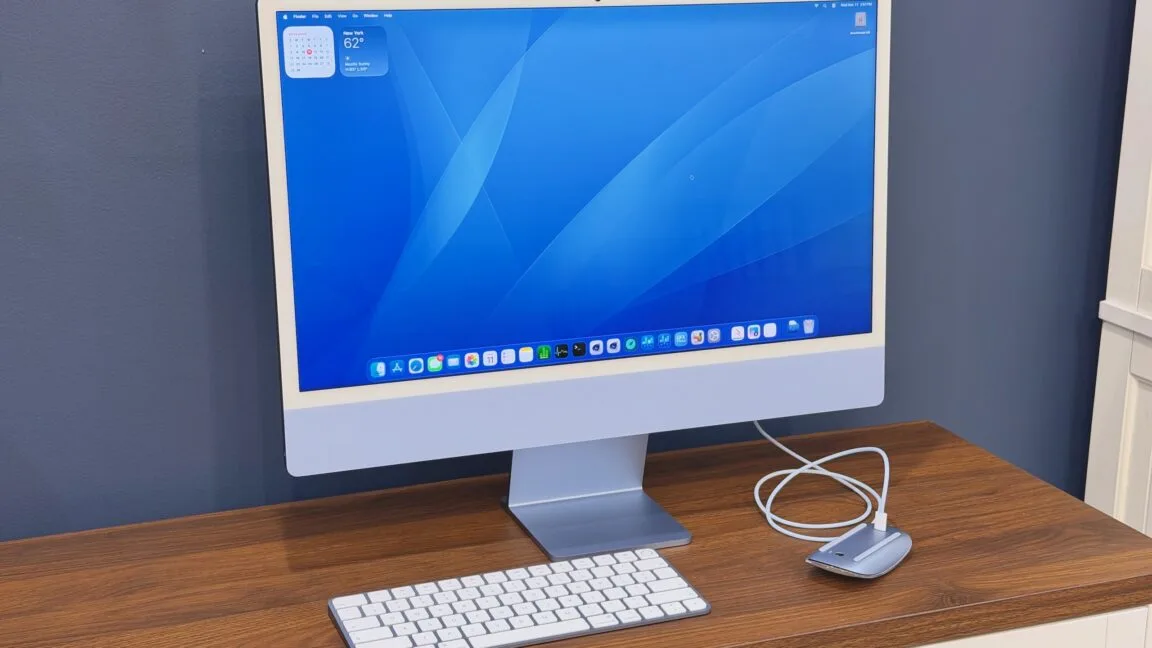
Apple released the fourth iteration of its Apple Silicon iMac this month, marking the latest chapter in a product line that has resisted the kind of dramatic reinvention seen elsewhere in the Mac lineup. While the MacBook Pro gained a more premium aesthetic, the Mac mini became more compact, and the Mac Studio effectively replaced the Mac Pro, the iMac has clung to its thin, screen-on-a-stand silhouette—a design language stretching back to the original Bondi Blue G3.
The new machine presents itself as a clean, minimalist desktop computer, the kind regularly spotted in small offices and television sets depicting professional workspaces. Yet it occupies an increasingly niche position in Apple's portfolio, no longer the company's primary workstation offering. Examining the M6 iMac through the lens of entry-level buyers—those seeking simplicity and longevity—reveals what this refresh actually delivers for users considering an upgrade from the M1 generation or comparing it against discounted M4 models.
Same friendly face
For those unfamiliar with Apple Silicon iMacs, the design represents a dramatic departure from the older aluminum Intel generation. The machine is substantially thinner, dominated by a 24-inch display surrounded by a relatively prominent white bezel—a design choice Apple has maintained despite occasional wishes from users for darker alternatives.
The iMac distinguishes itself as Apple's most vibrant computer offering. Every component arrives color-coordinated: the front panel, rear casing, stand, keyboard, input devices, trackpad, and even cables all match. While Apple has adjusted its color palette and refined individual hues throughout the Apple Silicon era, the M6 model retains the same seven color options—six saturated tones plus silver—that shipped with the M4.
The entry-level $1,499 configuration mirrors MacBook Air connectivity, featuring two Thunderbolt ports on the rear and a headphone jack on the side. This tier restricts buyers to a reduced M6 variant with 10 CPU cores and 10 GPU cores rather than the full 12 of each, caps RAM at 24GB, starts with 256GB storage and maxes out at 1TB, and omits Touch ID from the standard keyboard—an $80 upgrade requiring the numeric keypad version.
The $1,699 model serves users still treating the iMac as a workstation machine. It unlocks the full-speed M6 with all CPU and GPU cores enabled (subject to thermal considerations discussed later), permits 32GB RAM and up to 2TB storage, and includes four Thunderbolt ports for peripheral expansion. Both keyboard options at this tier incorporate Touch ID.
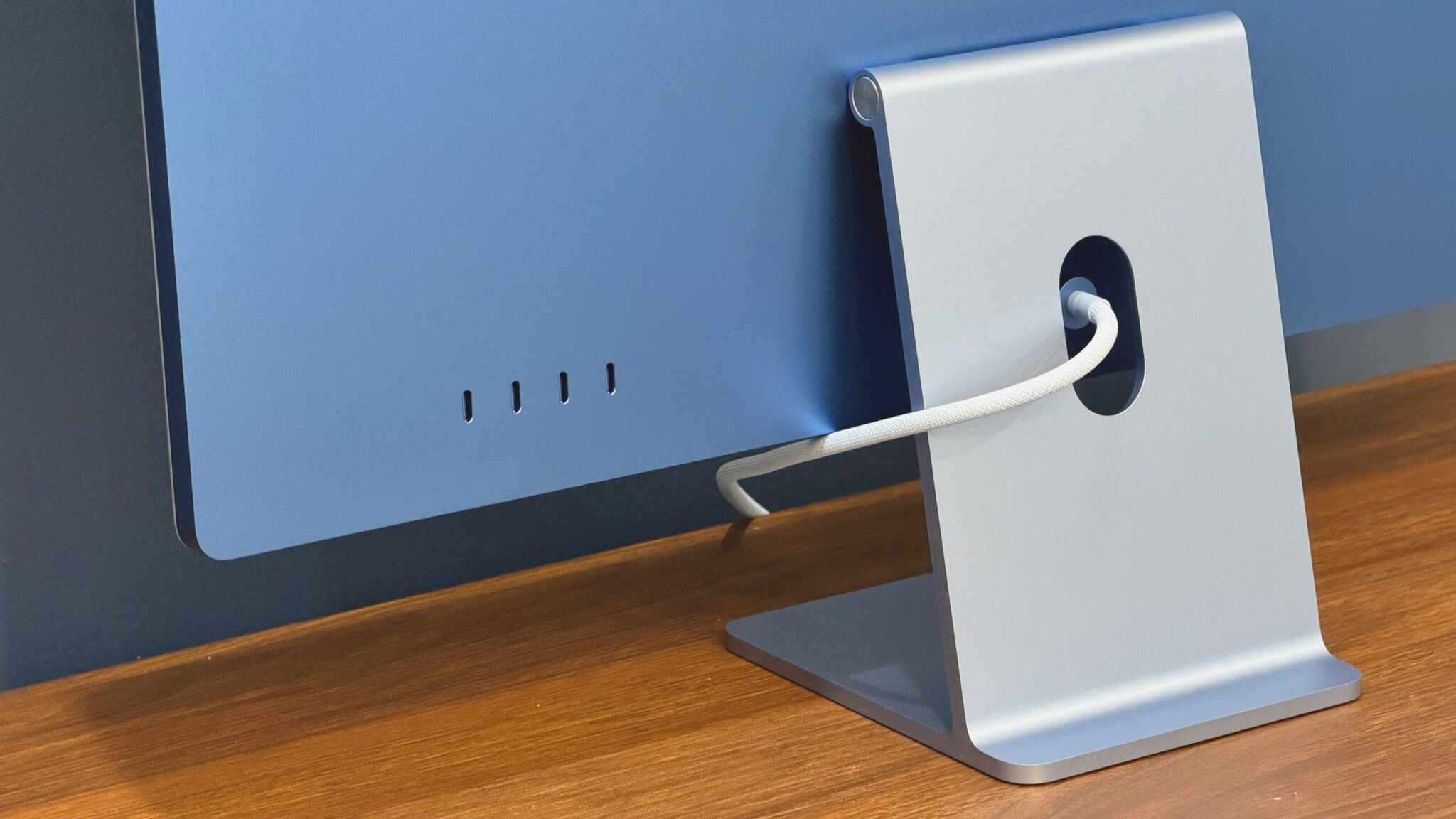
A 2.5 gigabit Ethernet port can be added to any configuration for $30, with the connection built into the power adapter rather than the display itself—a design that keeps networking cables routed through the desk's cable management system. All iMacs also offer a VESA mount bracket as a free alternative to the standard stand.
The coordinated aesthetic—matching keyboard, input device, and cables—creates a cohesive visual package that complements even the white bezel. However, this design premium carries substantial cost. The $899 Mac mini contains identical silicon, RAM, and storage while undercutting the iMac by $800. Adding a quality 4K display to the Mac mini would not approach that price differential, even with premium features like high refresh rates.
The iMac's pricing structure explicitly charges for visual presentation and integrated convenience. This represents the machine's fundamental value proposition—buyers should simply confirm that aesthetic cohesion justifies the expenditure.
The evolution of the iMac
The iMac's progression through the Apple Silicon era has proceeded methodically and conservatively. Base storage capacity has never increased, with both the M4 and M6 entry models still limited to 256GB. The base configurations remain restricted to a single external display, while upgraded versions finally surpass the previous Intel model's dual-display ceiling.
Existing Apple Silicon iMac owners experiencing satisfaction with current performance and harboring no desire for additional RAM or display support will find limited incentive to upgrade to the M6. The machine is undeniably faster, yet the M1 generation continues delivering reliable daily performance six years after its introduction, particularly when paired with 16GB RAM.
Prospective iMac buyers should consider the refurbished or sale-priced M4 as the superior value proposition. That generation still provides 16GB minimum RAM, Thunderbolt connectivity across all four ports in the four-port configuration, 32GB RAM availability, nano-texture display options, and multi-display support in the four-port variant.
The M6 builds meaningfully upon that foundation with tangible performance advantages. However, the most significant generational divide in Apple Silicon iMac history separates the M3 and M4 models, not the M4 and M6—a distinction that holds despite the two-generation silicon progression.
Performance and power
The M6 processor configuration comprises 12 total CPU cores split between two super cores, four performance cores, and six efficiency cores, paired with either 10 or 12 GPU cores, 16GB to 32GB RAM options, and a doubled Neural Engine NPU featuring 32 cores instead of 16. The iMac's M6 incorporates architectural refinements debuted with the M5, notably neural accelerator hardware integrated into GPU cores. This enhancement accelerates certain local AI workloads compared to the M4, including MetalFX upscaling and frame generation in games.
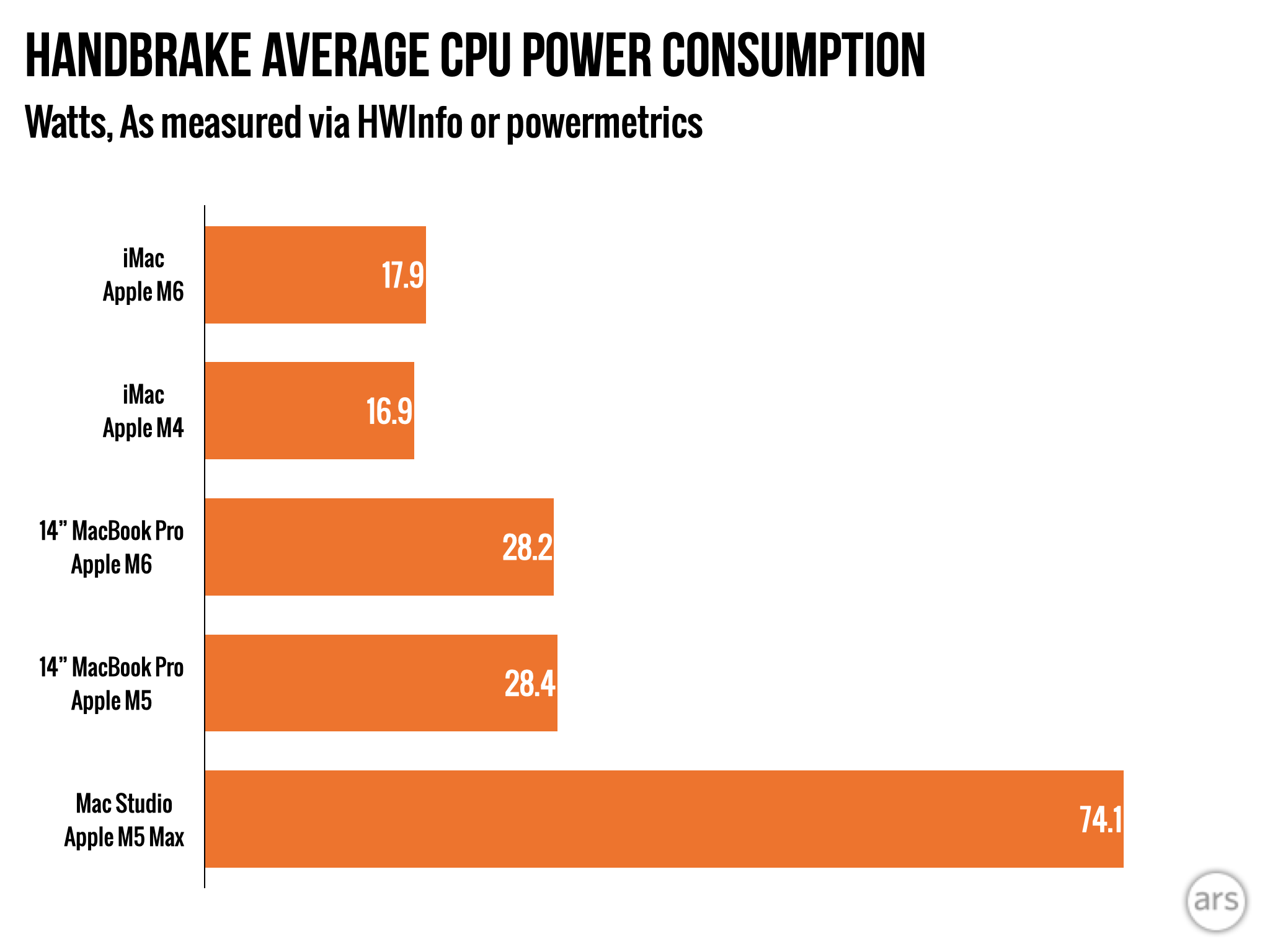
The M6 implementations in the Mac mini and 14-inch MacBook Pro deliver comparable performance within approximately 28 W sustained power consumption. The 16GB RAM configuration exhibits marginally reduced gaming and bandwidth-sensitive performance—the 16GB M6 provides 153 GB/s memory bandwidth versus 170 GB/s in the 24GB and 32GB versions. This represents a negligible practical difference.
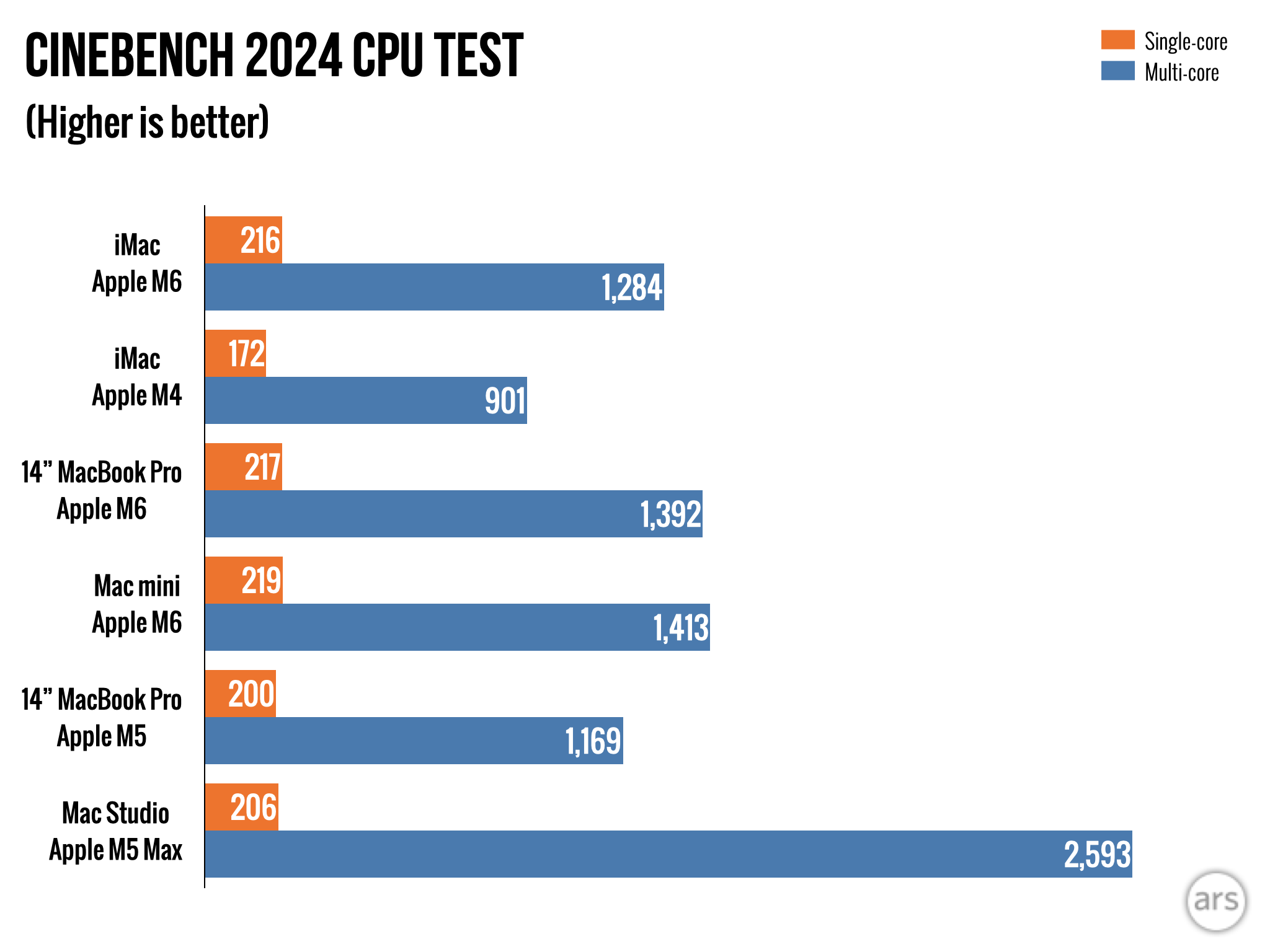
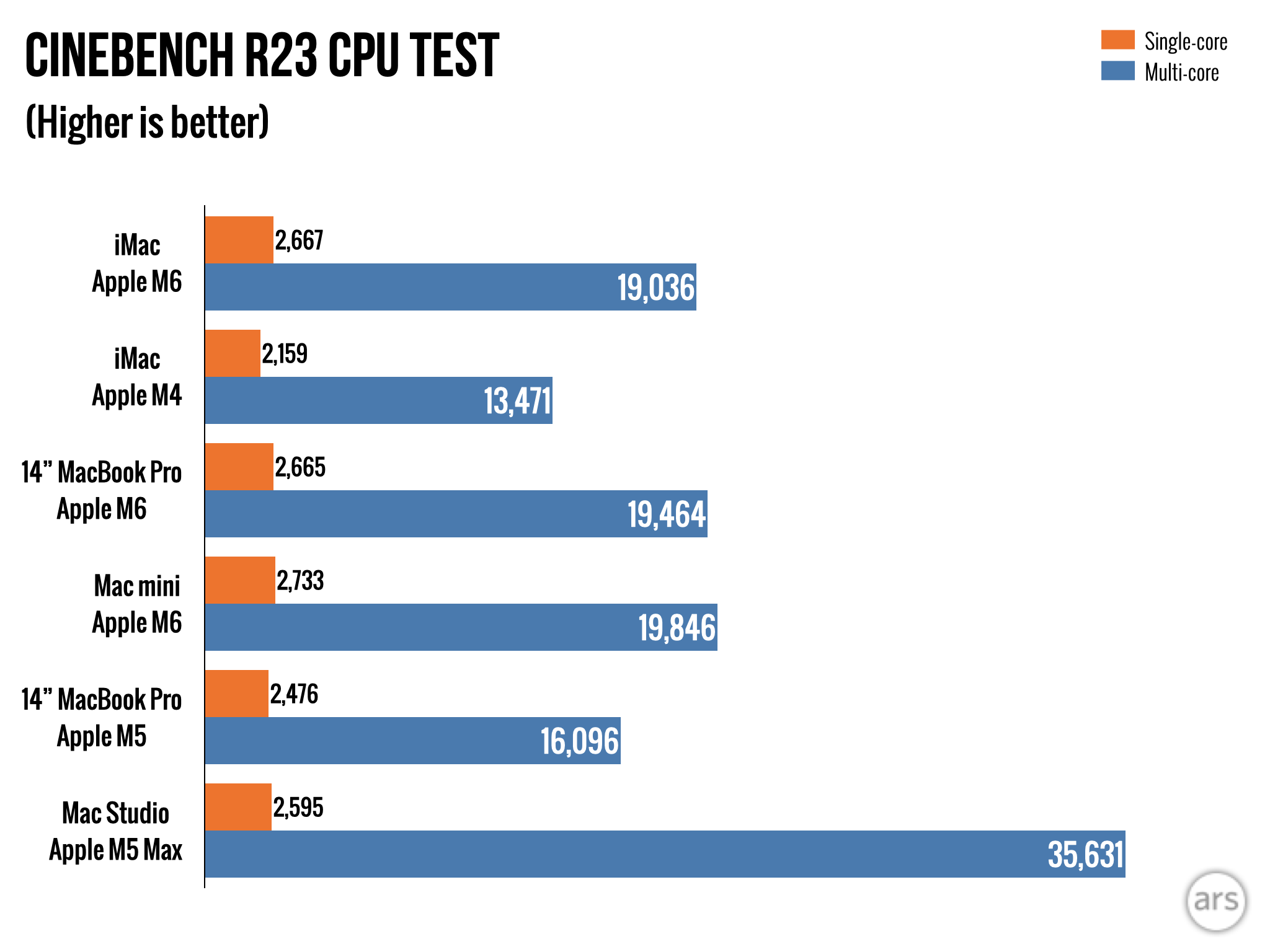
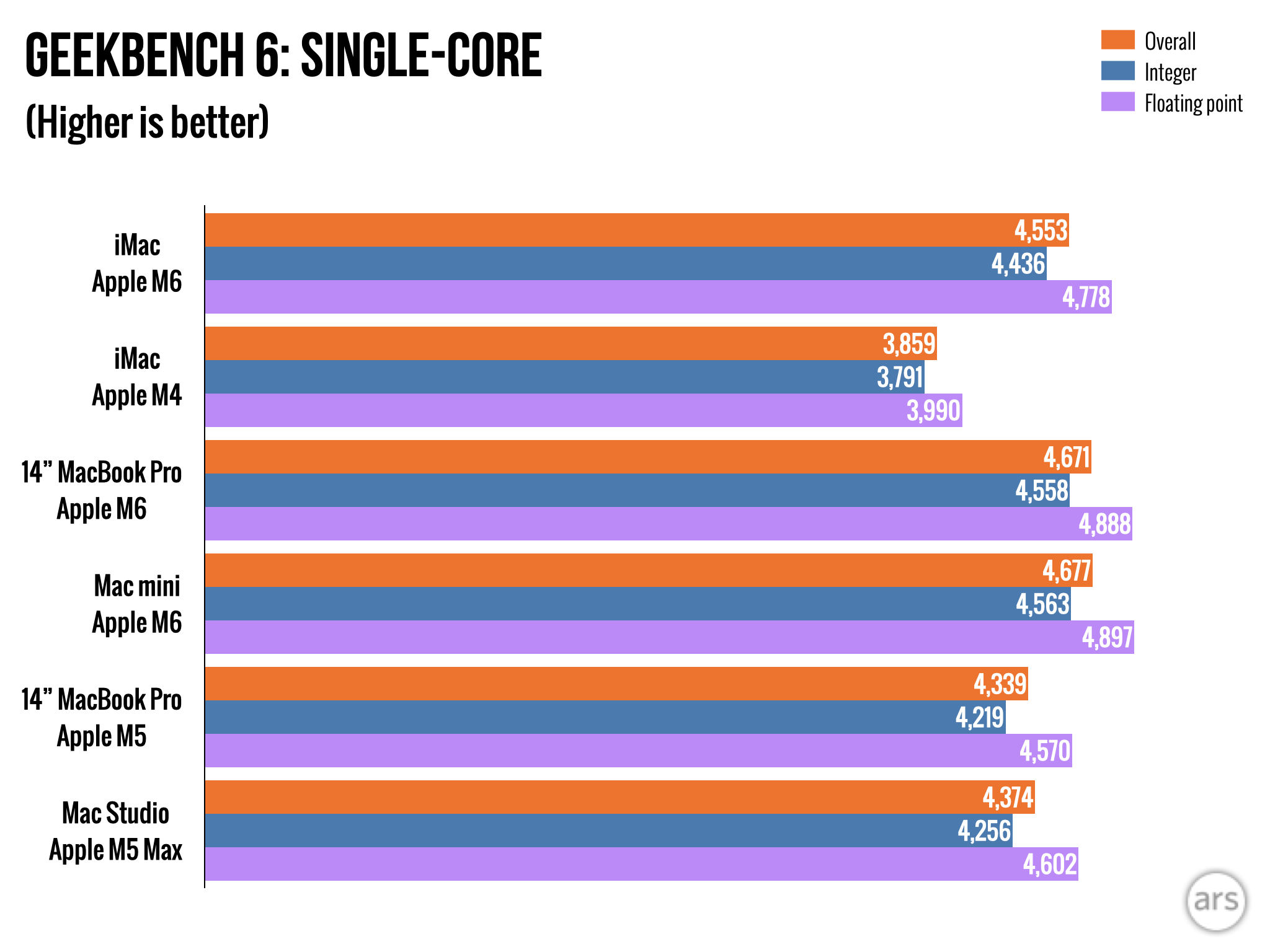
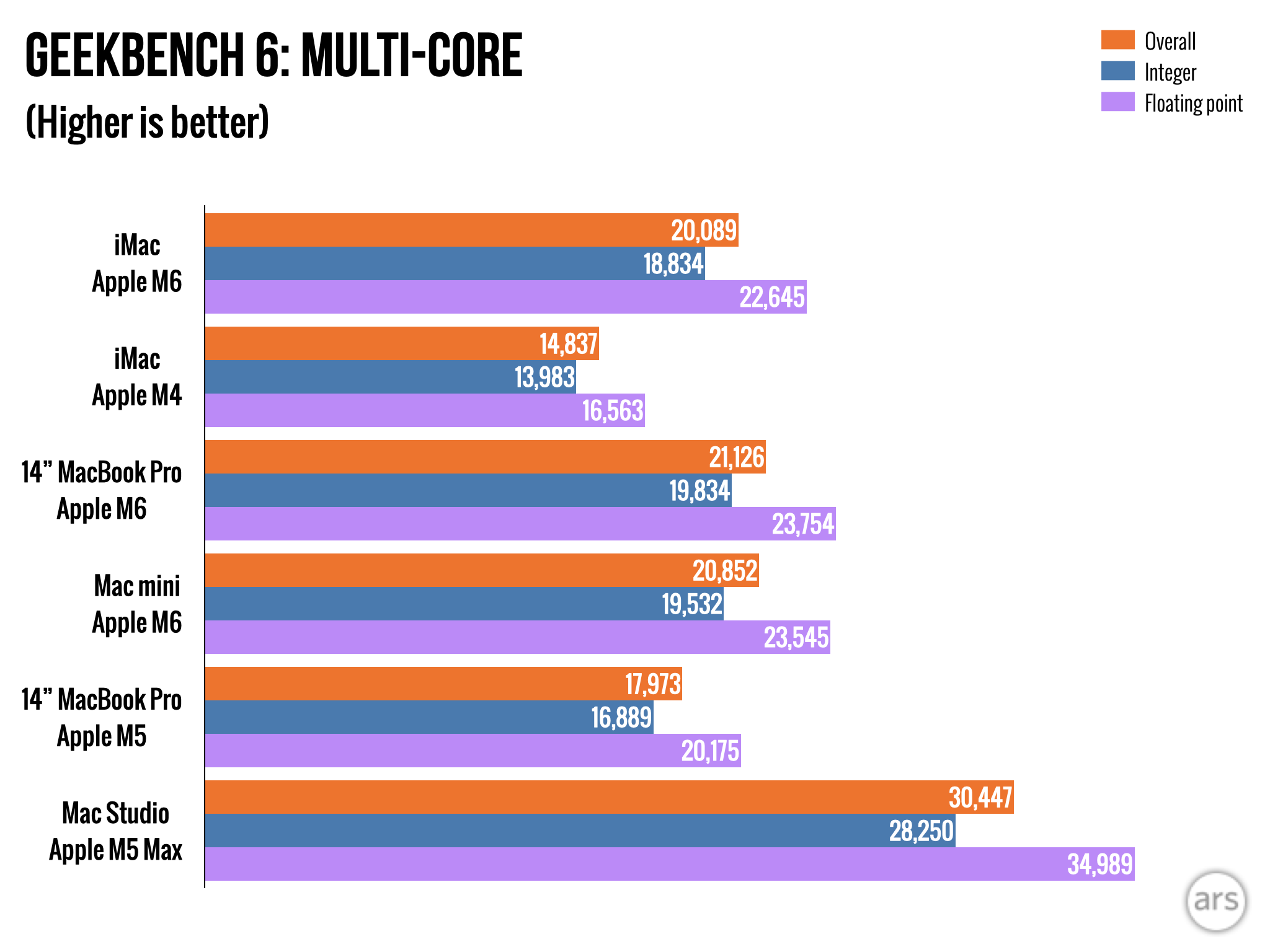
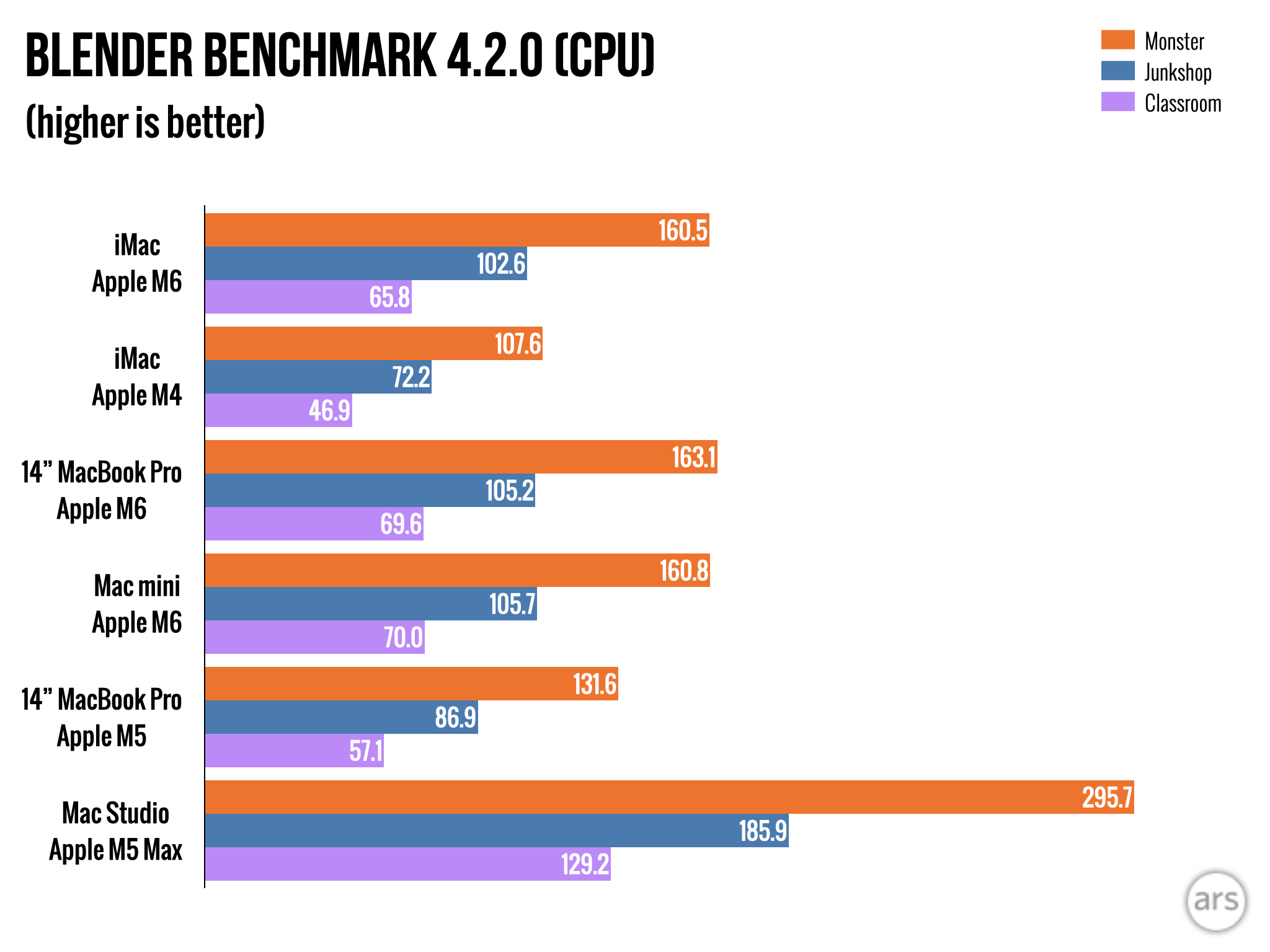
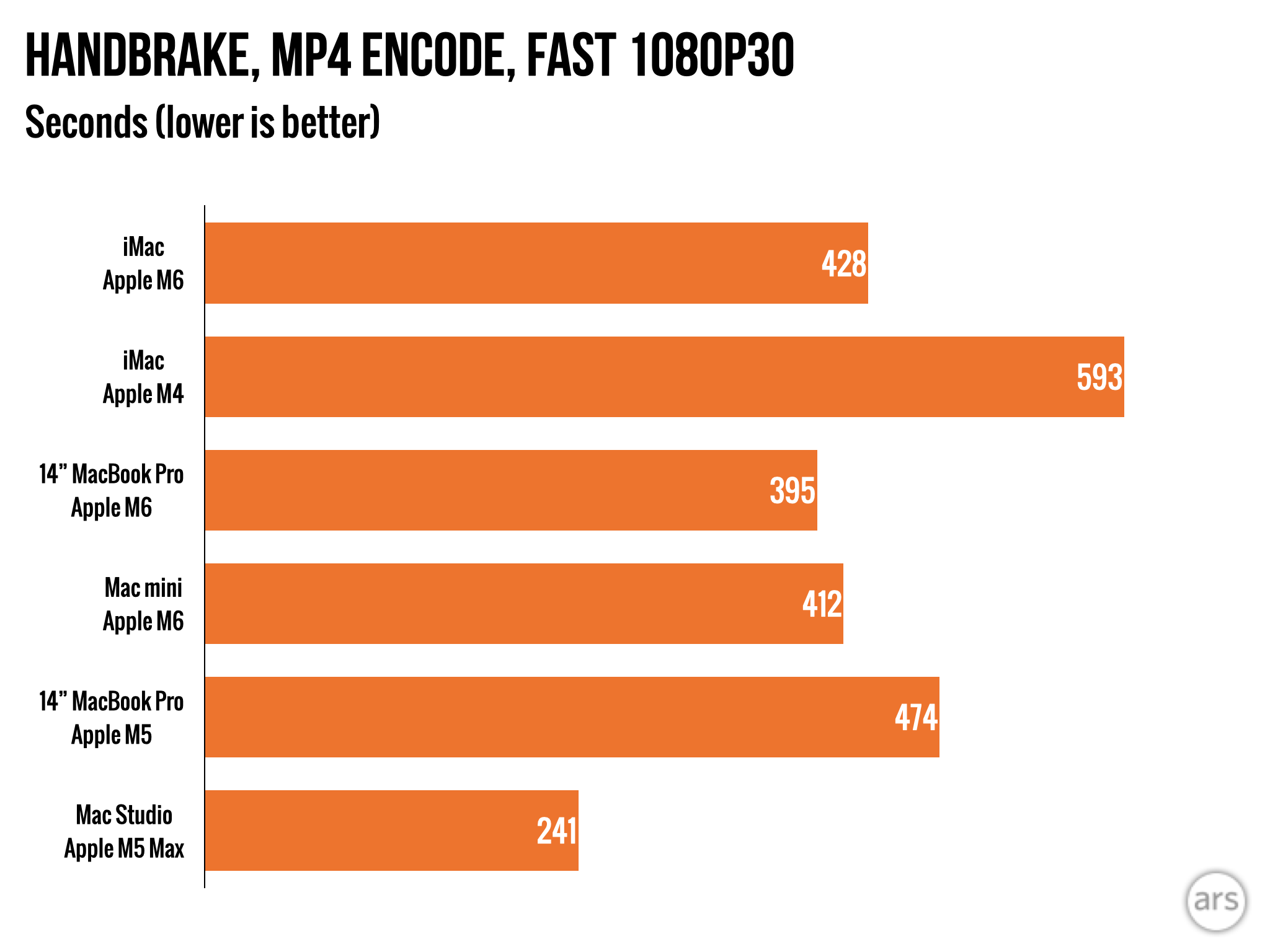
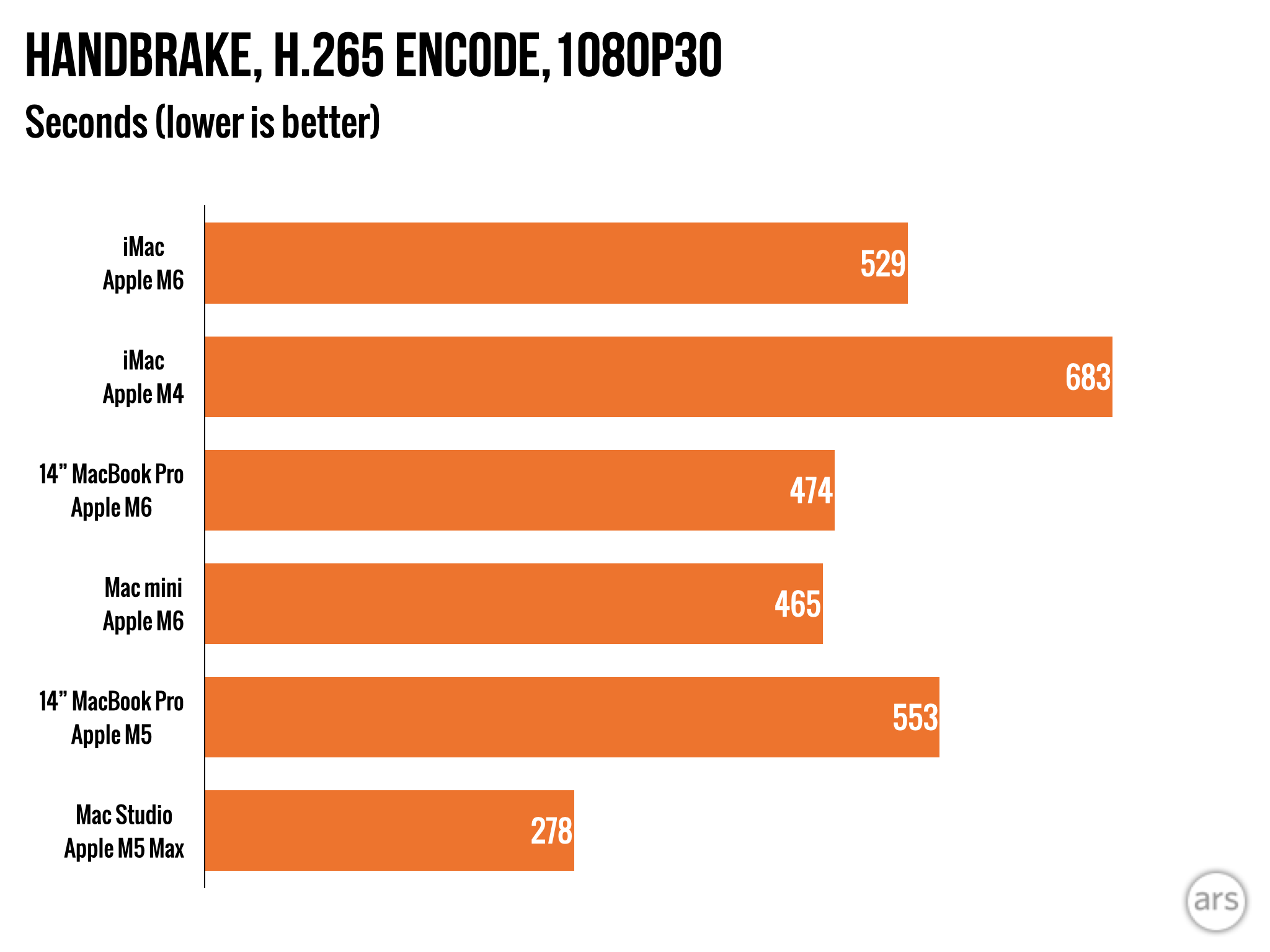
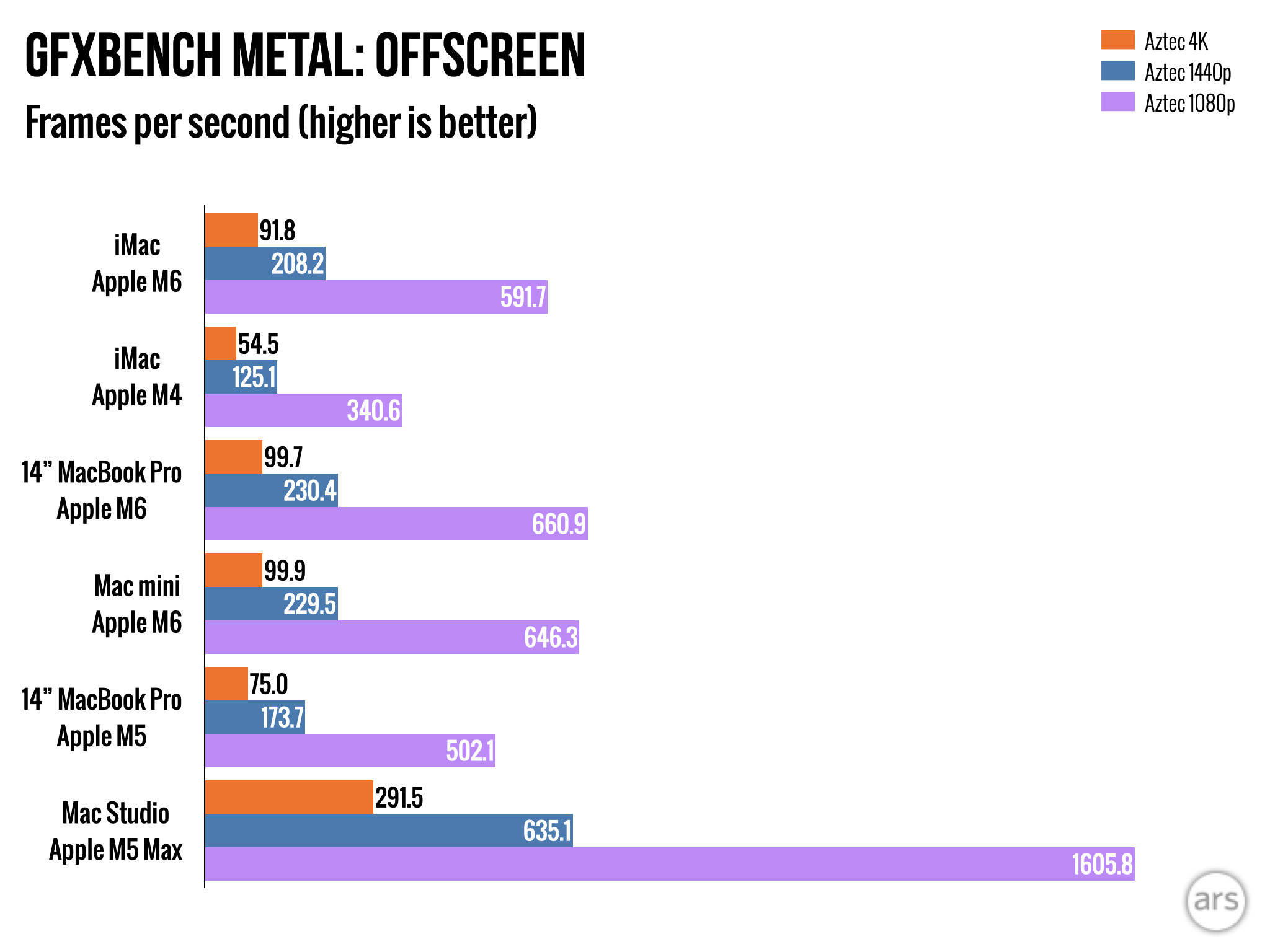
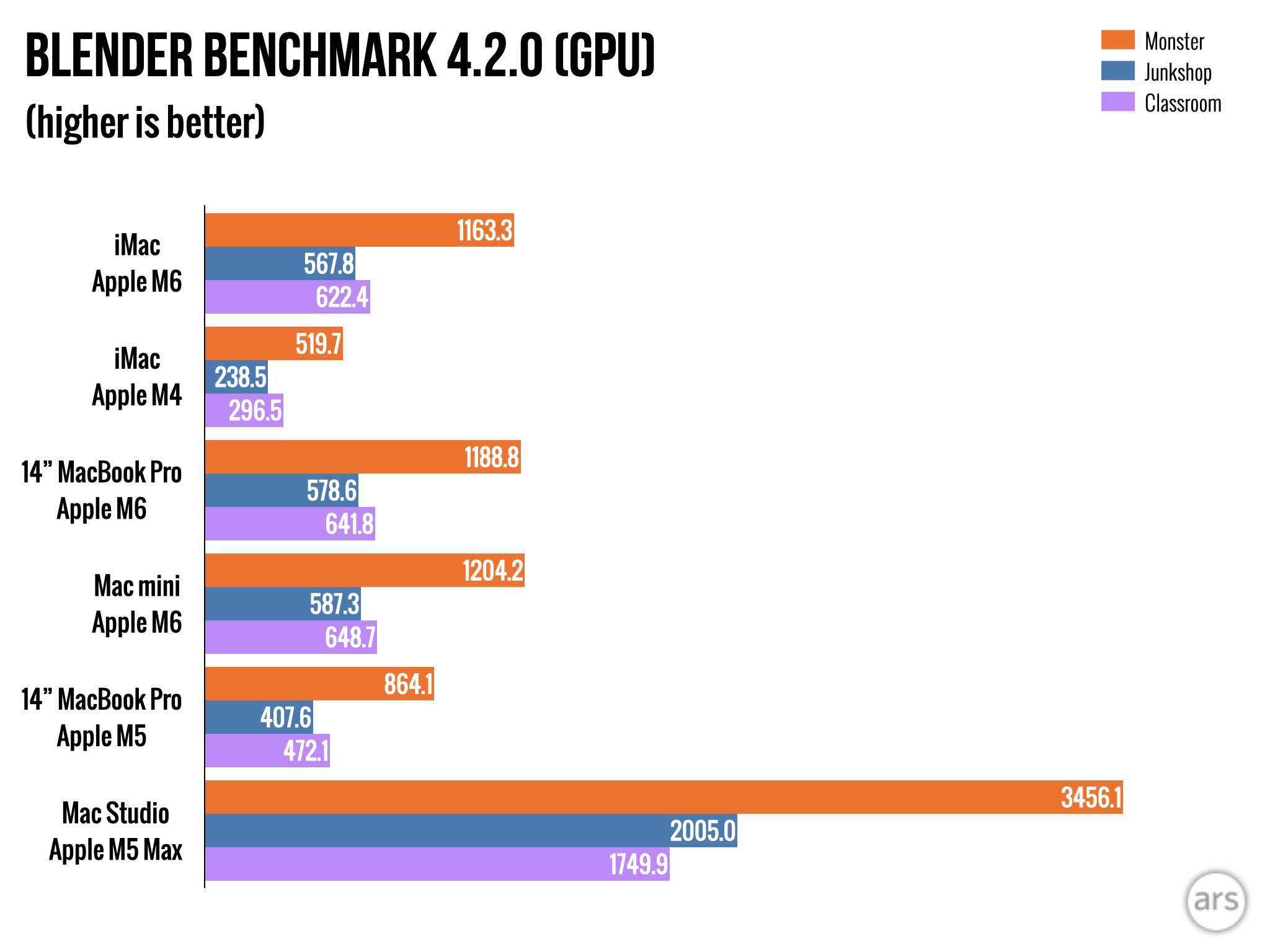
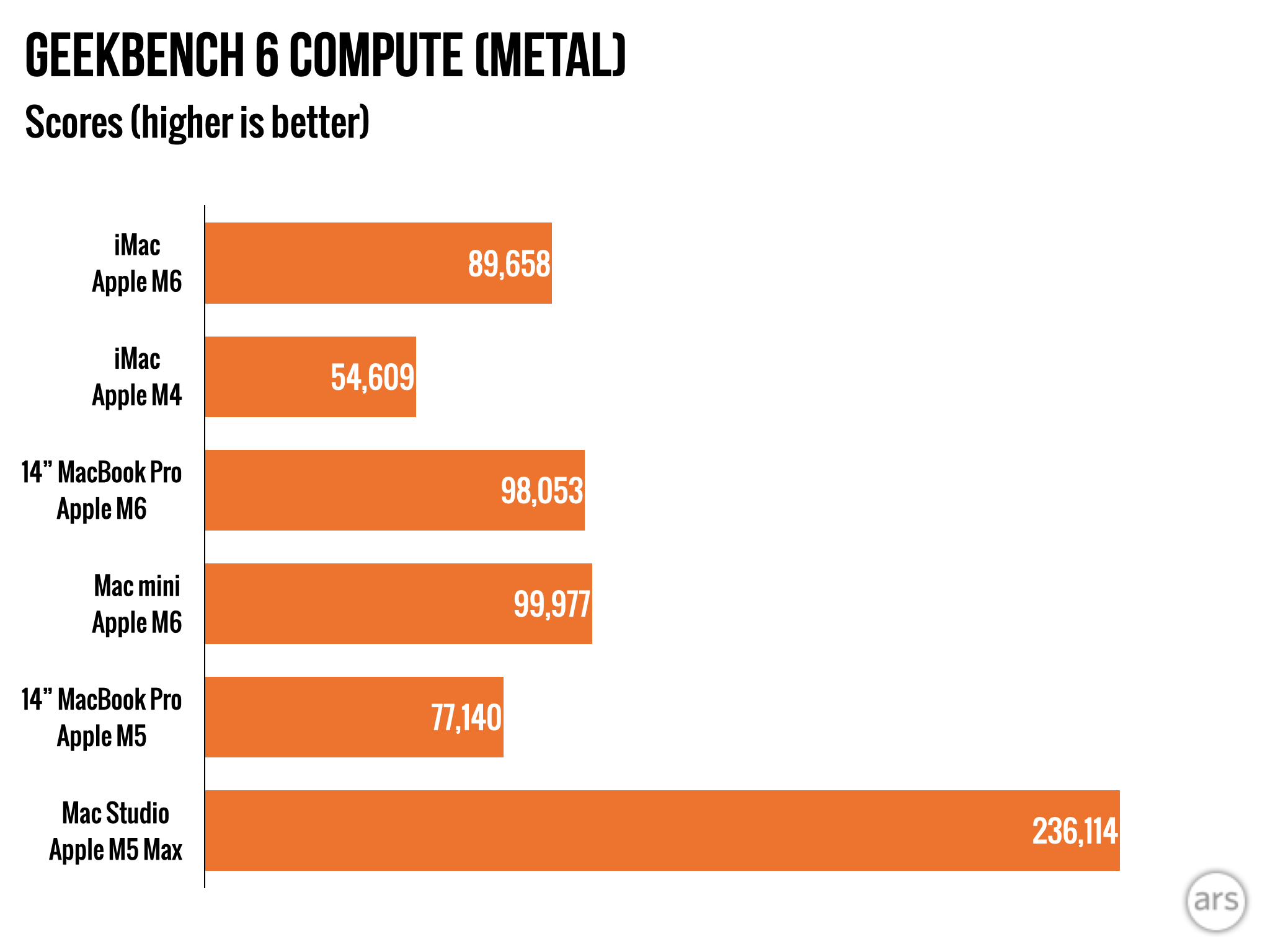
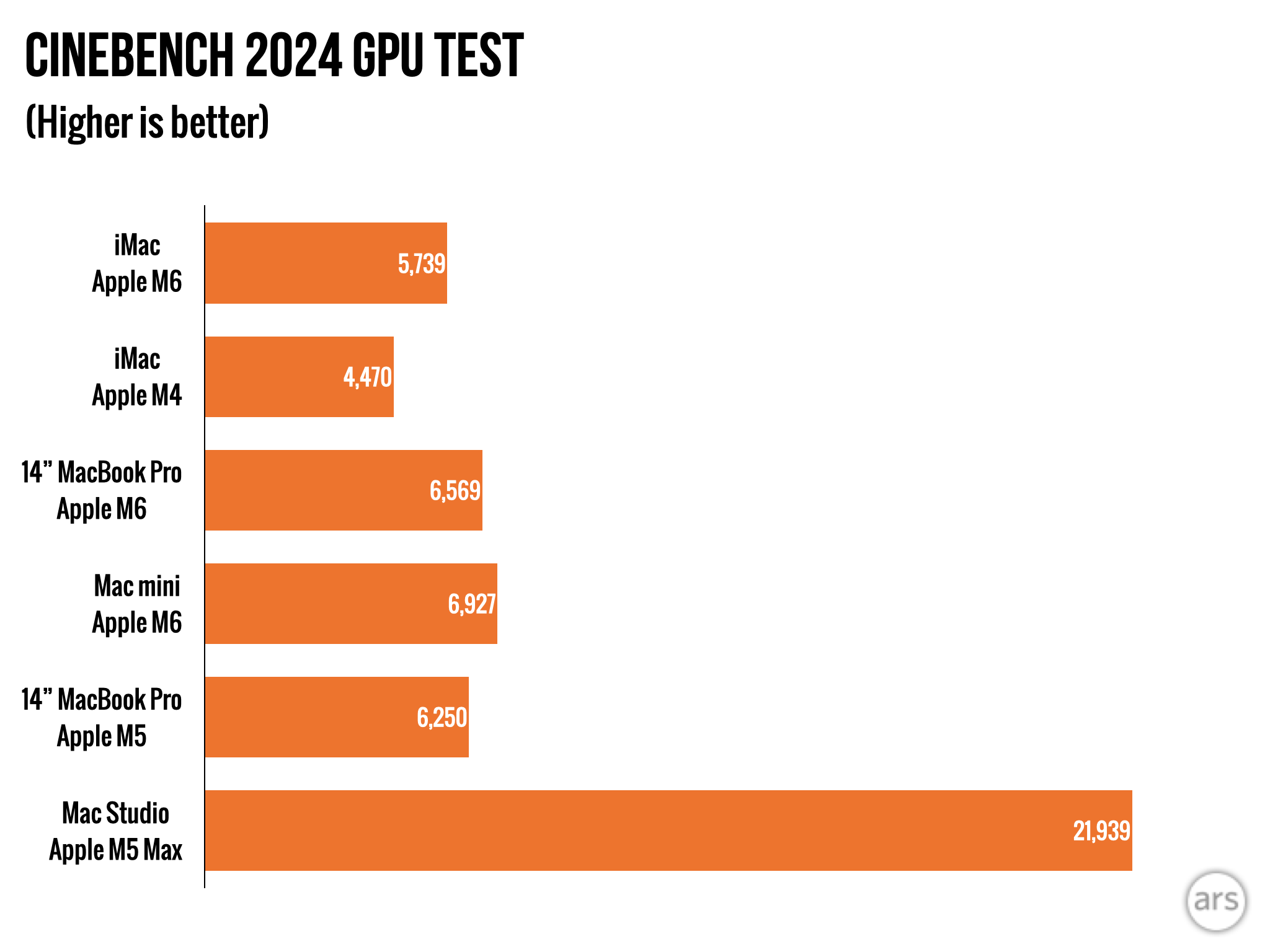
The iMac's M6 underperforms relative to both competing Macs, particularly in multi-core CPU and graphics benchmarks. HandBrake video encoding testing identifies the likely cause: the iMac's M6 averages 18 W power consumption under sustained heavy workloads. Despite retaining an active cooling fan that prevents the aggressive throttling seen in MacBook Air models, the constrained power envelope results in Mac mini and MacBook Pro versions running 5 to 8 percent faster on multi-core CPU tasks and 8 to 12 percent faster on graphics benchmarks.
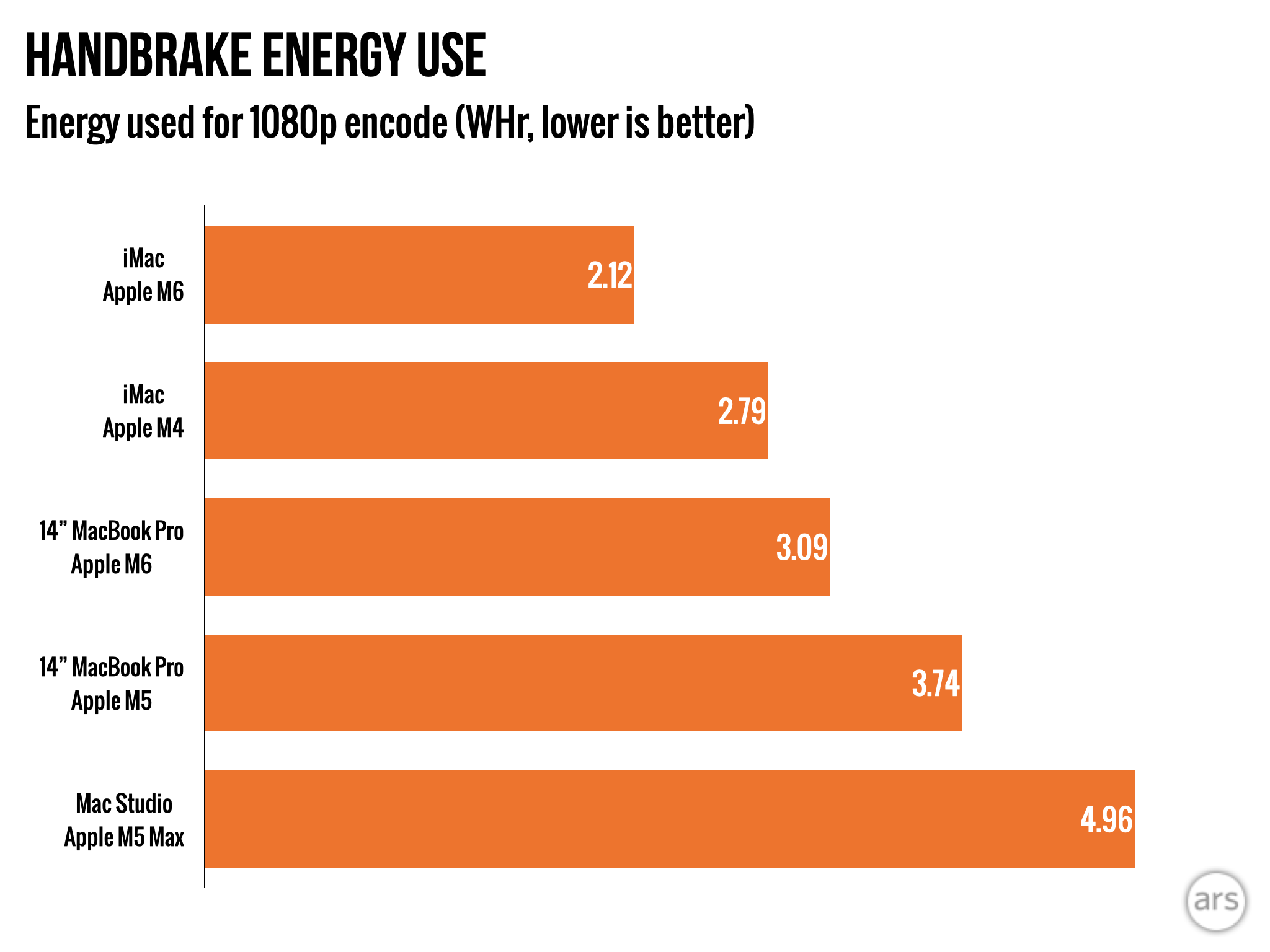
The reduced power envelope delivers a compensating advantage: the iMac's chip achieves superior efficiency compared to the standard M6 and the iMac's M4 predecessor, accomplishing equivalent work while consuming substantially less energy.
This efficiency improvement still constitutes a meaningful upgrade from the M4. The iMac's M6 achieves 15 to 20 percent faster single-core CPU performance, 20 to 30 percent faster multi-core CPU performance, and 20 to 40 percent faster graphics performance compared to its predecessor—with Blender GPU benchmarks showing even more dramatic gains, seemingly favoring the neural accelerators present in M5 and M6 GPUs. Configured with 24GB or 32GB RAM, the machine proves entirely capable of anchoring a multi-monitor workstation or supporting light photography and video editing workflows.
What meets the eye
The M6 iMac introduces virtually no changes to the machine's intended audience, its position within Apple's product hierarchy, or its technical capabilities. This represents a straightforward component refresh—the box being checked reads simply "maintain current internal specifications."
Today's iMac serves the same user categories it addressed in 1998: individuals rejecting laptop computing, organizations requiring an intuitive and approachable office or kiosk machine, and those prioritizing aesthetic appeal without demanding elaborate display or cable configuration.
The iMac's cable management represents its most compelling advantage. While a Mac Studio desktop delivers capable performance and flexibility, achieving multi-system connectivity to gaming PCs and other hardware typically results in a barely-controlled cable situation. The iMac's integrated design minimizes this chaos.
Anyone struggling with cable management who lacks need for complex system configurations represents an ideal iMac candidate. The machine's saturated color palette remains visually distinctive, though it would prove equally compelling in laptop or alternative desktop form factors.
The good
- Attractive and capable desktop system that substantially reduces typical desktop cable clutter
- Power-efficient operation with minimal fan noise during normal usage
- M6 processor delivers strong performance; 24GB or 32GB RAM configurations handle virtually all standard workloads
- Multi-display support available in the faster configuration, matching M4 capability
The bad
- Restricted connectivity options
- $200 price increase relative to M4 launch pricing
- Base configuration remains limited to 256GB storage
- Performance trails M6 implementations in Mac mini and MacBook Pro
- Touch ID requires $80 keyboard upgrade on base model